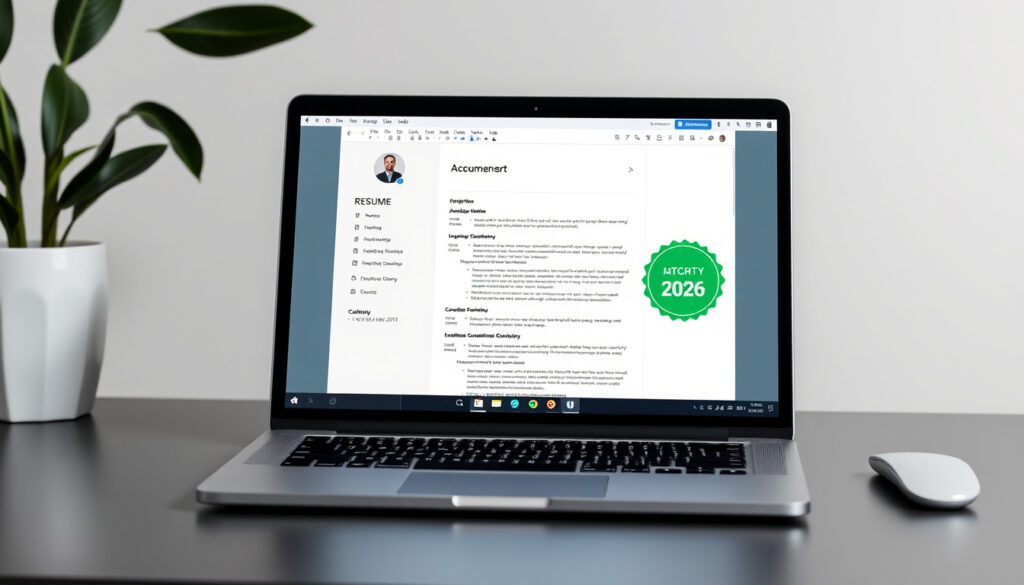
Resume Template Google Docs: Free 2026 ATS Options
Most people spend more time picking a Netflix show than polishing their resume—until a recruiter’s software silently rejects them in under 30 seconds. The good news: you don’t need expensive software to build an ATS-friendly resume that actually gets read. Google Docs has you covered with free templates, and the right one can make the difference between an automatic discard and a callback.
Employer scan time: 7–30 seconds ·
Free template sources: gdoc.io, thegoodocs.com ·
ATS-friendly options: Available in templates ·
Harvard template access: docs.google.com direct link ·
Built-in templates: Yes in Google Docs
Quick snapshot
- Free templates exist from multiple sources (TheGoodocs)
- Jobscan offers 15 free ATS-friendly templates (Jobscan)
- Most successful template varies by employer
- Exact ATS algorithm scoring differs by company
- ResuFit published 2026 Google Docs CV guide (ResuFit)
- Affine.pro released 10 best templates for 2026 (Affine.pro)
- Choose template → Customize sections → Run ATS check
- Export as DOCX or PDF for submission
| Fact | Value | Source |
|---|---|---|
| Built-in templates | Yes | Google Docs |
| Free providers | gdoc.io, thegoodocs.com, Reddit | CV Anywhere |
| Harvard access | docs.google.com copy | Harvard Career Services |
| Scan rules | 7–30 seconds | Career coaches |
| Jobscan free templates | 15 | Jobscan |
| ResumeWorded templates | 350+ | ResumeWorded |
| ResumGO templates | 300+ | CV Anywhere |
| Enhancv templates | 90+ | Enhancv |
Is there a resume template in Google Docs?
Yes—and you probably already have access to one without knowing it. Google Docs ships with built-in resume templates that require nothing to download or install.
Built-in options
Navigate to Google Docs → File → New → From template gallery. The “Resumes” section offers four clean, ATS-friendly designs that auto-save to your Drive. According to ResuFit (a career guidance platform updated for 2026), these native templates use standard fonts and avoid text boxes—two features that keep Applicant Tracking Systems from misreading your content.
Free third-party sources
Beyond Google’s built-in gallery, the open web offers significantly more variety. TheGoodocs provides free editable ATS-friendly templates in both Google Docs and Word formats with clean formatting and keyword examples, according to their free resource library. Jobscan designed 15 templates specifically for ATS compatibility, accessible via “Make a copy” directly in Google Docs. ResumeWorded offers over 350 professionally designed options including single-column ATS-compatible layouts. ResumGO delivers 300+ modern templates in US Letter sizing, completely free.
The pattern among these free sources is straightforward: they all use “Make a Copy” workflows, no signup required in most cases.
Your resume won’t get lost in automated filters thanks to free ATS-friendly resume templates that follow the exact formatting rules recruiters’ software expects.
Is Google Docs ok for a resume?
Absolutely—provided you pick the right template and avoid a few common formatting traps. Google Docs has evolved into a legitimate resume-building platform, especially for job seekers who need accessibility, free access, and easy collaboration.
Pros and cons
Google Docs templates auto-save to cloud storage, eliminate file versioning confusion, and support real-time collaboration if you want a peer to review your resume before submission. The formatting tends to be clean and universally readable—which is exactly what ATS software needs to parse your information correctly.
The drawbacks are fewer but worth noting. Google Docs lacks the advanced design customization of tools like Canva or Adobe InDesign. If you’re applying to a creative role where visual design matters, a Google Docs resume might read as generic. Additionally, complex layouts with tables, columns, or text boxes can break ATS parsing entirely.
ATS compatibility
ResumeGenius notes that ATS systems reject resumes with non-standard formatting, tables, or images. The solution is deceptively simple: stick to single-column layouts with standard section headings like Experience, Education, and Skills. ResuFit’s 2026 guidance emphasizes avoiding text boxes and decorative graphics—stick to plain text formatting instead.
A visually stunning resume with headers in tables or columns might get filtered out before any human sees it, even if your qualifications are perfect.
Are there any totally free resume templates?
Yes—and some are genuinely excellent. The ecosystem of free Google Docs resume templates has matured considerably, offering options that rival paid alternatives in both design and ATS compatibility.
Top free Google Docs sources
- Jobscan — 15 free ATS-friendly templates designed by their team, accessible via “Make a copy” (Jobscan)
- TheGoodocs — Free editable ATS templates in Google Docs and Word with clean formatting and keyword examples (TheGoodocs)
- Rezi — Free ATS template with step-by-step usage: click to open, auto-save to Drive, and AI optimization tools (Rezi)
- ResumeWorded — 350+ professionally designed Google Docs templates, including single-column ATS-compatible options (ResumeWorded)
- AtoZPlacementKit — Direct Google Docs links for free ATS-friendly templates via “Make a Copy” (AtoZPlacementKit)
- ResumGO — 300+ free modern templates in US Letter sizing (CV Anywhere)
Canva alternatives
If you’re open to formats beyond Google Docs, Canva offers free printable resume templates with modern designs. The trade-off: Canva exports often include images or complex graphics that require careful PDF conversion to remain ATS-compatible. For pure Google Docs users, stick with the sources above.
You don’t need to be a resume expert to create a resume that works. Rezi’s free template walks you through AI-powered keyword targeting and ATS checking—tools that once required paid subscriptions.
What is the 30 second rule for resume?
Recruiters and hiring managers typically spend 7 to 30 seconds scanning a resume before deciding whether to read further. The 30-second rule (and its faster cousin, the 7-second rule) describes how recruiters triage stacks of applications quickly.
How to pass the scan
Novoresume (a career guidance platform) recommends tailoring your resume’s top third—your summary and first job entry—to your target role’s keywords. Recruiters often skim for specific terms that match the job description. If your resume loads as a wall of text or buries relevant experience below irrelevant details, you’ll lose the reader in those critical first seconds.
Minimalist single-column layouts are preferred by hiring managers for clarity, according to ResumeWorded’s analysis of employer preferences. These layouts place your most important information immediately in the reader’s line of sight.
Novoresume tips
- Lead with a 2–3 sentence professional summary, not an objective statement
- Use job title and company name as visual anchors
- Front-load accomplishments with measurable results (e.g., “Increased sales by 23%”)
- Keep formatting consistent across sections
The implication: your resume template needs to support scannable hierarchy, not just aesthetic appeal. A beautifully designed resume that obscures your key qualifications will cost you callbacks.
What is the 7 second rule for CV?
The 7-second rule (sometimes cited as 6 seconds) comes from eye-tracking studies on recruiter behavior. It describes the initial visual impression that determines whether a resume gets a full read or a quick reject.
Make an impression fast
Major, Lindsey & Africa (a legal executive search firm) advises candidates to think of their resume as a visual billboard, not a detailed biography. In those first 7 seconds, a recruiter decides whether your profile matches what they’re looking for. Clean formatting, strategic white space, and clear hierarchy matter as much as the content itself.
Common mistakes to avoid
According to Indeed.com UK career guidance, the most common CV mistakes that trigger instant rejection include:
- Non-standard fonts (unless the role specifically calls for design creativity)
- Images, icons, or logos that ATS cannot parse
- Tables used for layout (instead of data presentation)
- Headers and footers with contact information ATS cannot read
- Inconsistent date formatting
Getting rejected by an ATS before a human even sees your resume is one of the most frustrating parts of job hunting. The best templates use simple formatting that Applicant Tracking Systems can read without errors.
Pros and Cons of Google Docs Resumes
Upsides
- Completely free with a Google account
- Auto-saves to cloud—no lost files
- Easy “Make a Copy” template workflow
- Accessible from any device
- Collaborative editing for feedback
- Native ATS-friendly formatting available
Downsides
- Limited design customization vs. Canva
- Complex layouts can break ATS parsing
- No built-in AI optimization (except Rezi)
- Requires manual PDF/DOCX export
How to Access and Customize Free Templates
Ready to build your resume in Google Docs? Follow these steps to access the best free templates, customize them for your field, and ensure ATS compatibility.
- Access Google’s built-in gallery: Open Google Docs → File → New → From template gallery → select “Resumes.” Click “Use template” to make a copy you can edit.
- Access third-party templates: Visit TheGoodocs, Jobscan, or ResumeWorded. Click the template link and select “Make a copy” to save to your Google Drive.
- Customize section headings: Replace placeholder text with your actual experience. Keep standard headings (Experience, Education, Skills) for ATS readability.
- Tailor keywords: Review the job posting for required skills. Add these terms naturally in your summary and job descriptions.
- Check for prohibited formatting: Remove any tables used for layout, text boxes, images, or decorative graphics. Stick to plain text and bullets.
- Run a quick ATS test: Paste your resume text into a plain document and verify all information reads correctly without visual formatting.
- Export for submission: Download as Google Docs native format (for online applications) or PDF (for most job portals). Avoid .DOC format if possible—it can lose formatting.
The trade-off: Google Docs gives you solid, ATS-compatible foundations, but your final resume’s effectiveness depends on how well you customize the content and match keywords to each specific role.
Summary
Google Docs has grown into a legitimate resume-building platform for job seekers who need free, accessible, and ATS-friendly templates. The platform offers built-in options, plus a robust ecosystem of free third-party templates from TheGoodocs, Jobscan, ResumeWorded, and others. For most job seekers—not just those targeting creative roles—a clean Google Docs resume with standard formatting will outperform a visually complex one that ATS software struggles to parse. Job seekers who follow this path will consistently outperform candidates who submit poorly formatted resumes to automated screening systems.
“Your resume won’t get lost in automated filters thanks to our free ATS-friendly resume templates.”
“Getting rejected by an ATS before a human even sees your resume is one of the most frustrating parts of job hunting.”
Related reading: Free Google Slides Templates · Free Photo Editing Software
Google Docs provides several free built-in resume templates alongside ATS-friendly options like Harvard and student designs for 2026 job hunts.
Frequently asked questions
What is the most successful CV template?
The most successful CV template is one that uses single-column layout, standard fonts, clear section headings, and ATS-friendly formatting. According to ResumeWorded, minimalist designs that prioritize scannability consistently outperform visually complex layouts when evaluated by both ATS software and human recruiters.
Which template do most employers prefer for resumes?
Most employers prefer clean, professional single-column resumes with clear hierarchy. Research from ResumeWorded and career coaching platforms indicates that hiring managers favor templates that allow quick scanning—typically those with bullet points, consistent formatting, and no visual clutter that obscures key qualifications.
What are three disadvantages of Google Docs?
Three disadvantages of using Google Docs for resumes are: limited design customization compared to tools like Canva or InDesign; risk of formatting issues if you use tables or text boxes for layout; and the need for manual export handling when submitting to different job portals. Additionally, Google Docs lacks built-in AI optimization tools unless you use a third-party service like Rezi.
What is the most common CV mistake?
According to Indeed.com UK career guidance, the most common CV mistake is using non-standard formatting that ATS software cannot parse—particularly tables for layout, images, text boxes, or decorative graphics. Other frequent mistakes include inconsistent date formatting, burying relevant experience below irrelevant details, and failing to include keywords from the job description.
How to make a copy of Harvard resume template?
Harvard Career Services provides free resume templates accessible via direct docs.google.com links. Navigate to Harvard’s career resources, find the resume template section, and click the template link. In Google Docs, select File → Make a copy to save your own editable version. You can then customize the headings and content to match your experience.
Are Google Docs resumes ATS-friendly?
Yes—Google Docs resumes are generally ATS-friendly, provided you use standard formatting. TheGoodocs and Jobscan both offer templates specifically designed for ATS compatibility. Key rules: use standard fonts (Arial, Calibri, Times New Roman), stick to single-column layouts, avoid tables or text boxes for structure, and use bullet points instead of numbered lists for experience entries.
What are the best student resume templates in Google Docs?
For students, the best Google Docs resume templates are those from TheGoodocs (combination resume formats) and ResumeWorded (350+ options including single-column ATS-compatible designs). TheGoogle Docs built-in gallery also offers student-friendly templates with clear sections for education, relevant coursework, and entry-level experience. Affine.pro lists 10 best templates suitable for 2026, many optimized for recent graduates.
More related posts
 Teen Mom: The Next Chapter: Where to Watch & Seasons
 Best Home Improvement Store Near Me: B&Q Alternatives in Ireland
 How to Reduce Inflammation in the Body: Fast, Effective Tips
 Alone in the Dark 2024: PS5 Review, Remake Facts
 Lowe’s Closing for 24 Hours: All Stores Shut on Easter
 Washington Wizards vs 76ers Match Player Stats: Full Breakdown
 Steve Buscemi Movies and TV Shows: Complete Guide
 Men to Women Shoe Size Conversion: Chart, Calculator & Guide